
Text Message (SMS) Policy — Hodor Solutions
Hodor Solutions LLC ("Hodor," "we") sends text messages only as part of our software products, and only to a number someone has agreed to receive them on. We send four kinds of text message, described below, and no others. We send no marketing or promotional text messages of any kind.
What we send
1. Sign-in security codes. A one-time code, sent when you sign in or when you are setting the method up. Available in Hodor CRM, Hodor Sign, Hodor Vault, and Hodor Contractor Portal, where text-message two-step sign-in is switched on. Frequency follows your own sign-ins: one message each time you sign in with a code.
Hodor Prints sends three kinds of text, and no others:
2. An invitation to join a company account. Sent when an administrator of a company adds a named person to that company and confirms that the person agreed to receive a text invitation. It carries the sign-up link, is sent once, and the link is valid for 7 days. We record which administrator confirmed the agreement and when.
3. Confirming a mobile number you added to your own account. Sent when you add a number to your own Hodor Prints account, so we can check the number is yours. It carries a confirmation link valid for 24 hours, names whose account it is, and tells you to ignore it if it was not you.
4. A passcode-reset link you asked for. Sent when you ask to reset your own passcode. The link is valid for 30 minutes, and it likewise tells you to ignore it if it was not you.
Nothing else is sent by text. We do not send appointment reminders, document or signature reminders, work-order or case notifications, marketing, promotions, or newsletters by text message. Hodor Books and Hodor Cal send no text messages at all.
Invitations, number confirmations and passcode-reset links name Hodor Prints and end with Reply STOP to opt out. Sign-in codes use our SMS provider's standard wording.
If we ever add another kind of message, this policy changes first, and any marketing program would be separate and would require its own explicit opt-in — you will never receive marketing texts because you switched on sign-in codes, accepted an invitation, or reset a passcode.
How opt-in works
For sign-in codes, you add your own mobile number yourself, inside your password-protected account, under Settings → Security. The screen states in full what the number will be used for before you submit it; we then text one code to confirm the number works. We store that you agreed, the exact wording that was on the screen, and the time. You can see that wording, and the screen itself, on our Text Message (SMS) Policy page.
For a Hodor Prints company invitation, an administrator of the company enters the person's name and mobile number and must tick that the person agreed to receive a text invitation before it can be sent; we record who confirmed it and when. A person who was added without that agreement is not texted.
For a number confirmation or a passcode reset, you are the one who starts it: the message goes only to a number you entered in your own account, or to the number already on your own account when you ask to reset your passcode. We send nothing to a number nobody asked us to use.
We never enrol numbers from purchased lists, rented lists, data brokers, scraped sources, or bulk imports.
How opt-out works
- Reply STOP to any message to stop texts from the number that sent it. Invitations, number confirmations and passcode-reset links all come from one Hodor Solutions toll-free number, so replying STOP to it stops all of them, whichever product sent them. Reply START to that number to receive them again.
- Sign-in codes come from our SMS provider's own verification numbers. To stop them, remove your number or switch off text-message sign-in in Settings → Security (see below), or reply STOP to the code message.
- Reply HELP for assistance, or contact support@hodorsolutions.com.
- Remove your number at any time in Settings → Security, which stops sign-in codes; you can also switch off text-message sign-in there and use an authenticator app or an emailed code instead.
- An invitation, a number confirmation, and a passcode-reset link are each sent once, in response to a single event, so there is nothing recurring to stop.
- Opting out of text messages does not affect your account or our email notices.
Who your number is shared with
Mobile phone numbers, SMS opt-in data, and records of your consent are never shared with or sold to third parties or affiliates for marketing or promotional purposes.
We disclose your number only to our SMS provider, Twilio, which acts as our service provider and sends the messages on our behalf, and where we are required to disclose it by law. No affiliate, advertiser, data broker, or lead buyer receives it, and we do not use it to build or enrich marketing lists.
The fine print
- Message frequency varies with your own activity: one sign-in code each time you sign in with one, and one message each time an invitation, a number confirmation, or a passcode reset is triggered. None of them repeat on their own.
- Message and data rates may apply, depending on your carrier and plan.
- Carriers are not liable for delayed or undelivered messages.
- Your number is used only as described here — see our Privacy Policy.
- Questions: support@hodorsolutions.com.
Version 202610v01 · effective October 6, 2026
What opt-in looks like
Text messages are only ever sent to a number somebody put in on purpose. There are two ways that happens across our products, and they are shown separately below because the consent behind them is different.
Invitation texts (Hodor Prints)
An administrator of a company adds a person to that company by name and mobile number. The form will not send anything until the administrator ticks “This person agreed to receive a text invitation” — it is required, and we record which administrator ticked it and when. A person added without that confirmation is never texted.
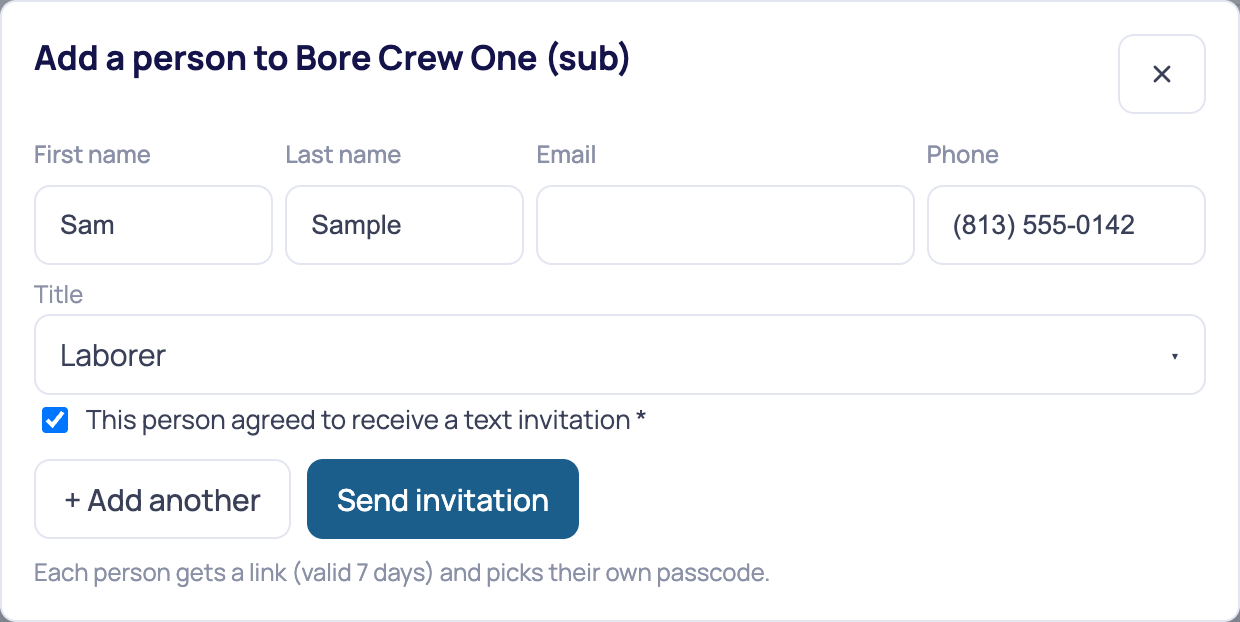
Every text Hodor Prints sends. There are three, and no others:
Invitation
sent once, only when the administrator ticked the consent box shown above
Dana Whitfield at Northline Electric invited you to Hodor Prints. Sign up here (link valid 7 days): https://app.hodorprints.com/invite/{token} Reply STOP to opt out.
Confirming a number you added yourself
sent once, to a number you entered in your own account
Hodor Prints: add this number to Sam Sample's account? Only if that is you: https://app.hodorprints.com/verify/{token} (24 hours). Not you? Ignore this. Reply STOP to opt out.
Passcode reset you asked for
sent once, only when you request it for your own account
Hodor Prints: pick a new passcode (link valid 30 minutes): https://app.hodorprints.com/reset/{token} Not you? Ignore it. Reply STOP to opt out.
{token} stands for the one-time link code, and names and company are filled in per message. Each of the three is sent once, in response to a single event; none repeats on its own, and every one ends with Reply STOP to opt out.
Sign-in security codes (Hodor Contractor Portal)
These are sent through Twilio Verify, which uses its own sender — not the toll-free number above. They are shown here because they are the other way a number reaches us. The account holder types their own mobile number under Settings → Security, reads what it will be used for, and presses Send code; we text one code to confirm the number works. Numbers are never imported, purchased, or entered by anyone else. Hodor CRM, Hodor Sign and Hodor Vault work the same way.
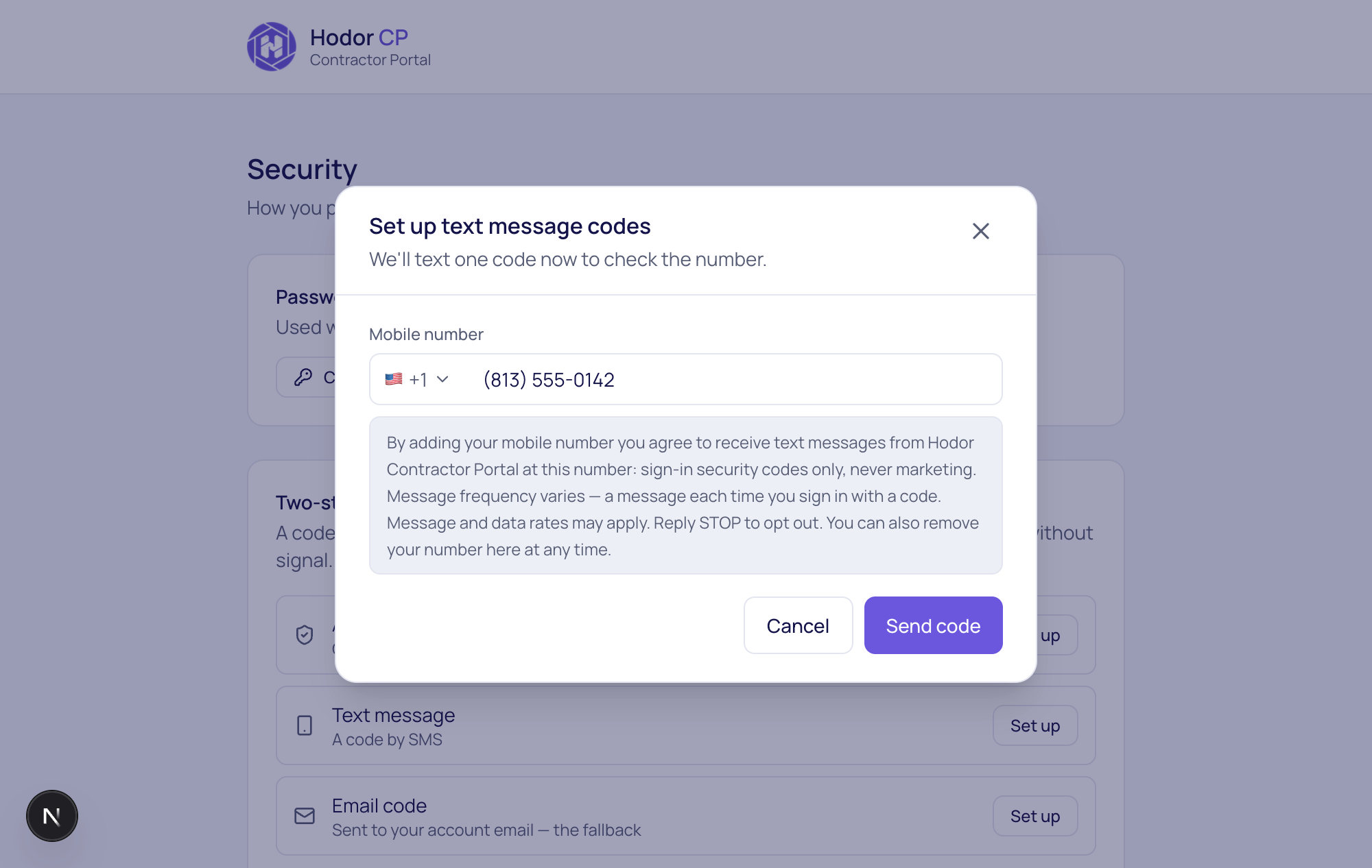
The exact wording shown before any message is sent:
By adding your mobile number you agree to receive text messages from Hodor Contractor Portal at this number: sign-in security codes only, never marketing. Message frequency varies — a message each time you sign in with a code. Message and data rates may apply. Reply STOP to opt out. You can also remove your number here at any time.
Consent wording version 2026-09-28. When the account holder confirms, we store that they agreed, this wording verbatim, and the time — so the record says what was actually on screen.